

Real-time availability
Availability updates instantly across your system, with no conflicts to untangle and nothing to fix by hand
Multi-channel calendar sync
Your website, mobile app, and partner platforms always show the same availability
Flexible booking rules
Capacity, buffers, cancellation windows, deposits, and custom scheduling logic, tailored to your operations
Instant Availability
Slots update in real time so customers always see what's actually available
Rules Applied Automatically
Capacity, buffers, deposits, and cancellation policies are enforced without manual checks
Calendar Sync Everywhere
Your website, app, and partner channels stay aligned to prevent conflicts
Confirmations & Reminders
Automated messages reduce no-shows and keep customers informed at every step
Built to fit your stack and scale with demand
Booking doesn't live alone. We integrate it with payments, CRM, analytics, and messaging, using API-first architecture, webhooks, and secure data practices.
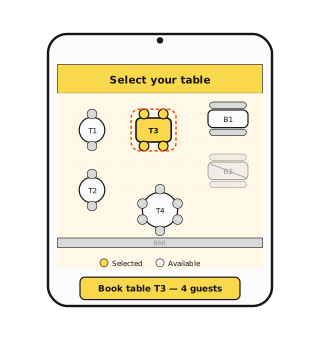
See the space. Own the choice
Pick your table straight from the interactive floor plan
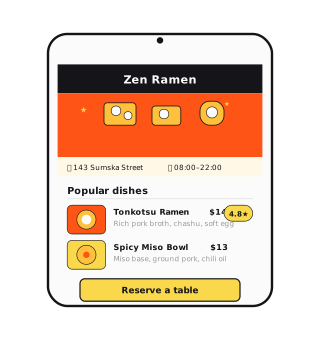
Taste the vibe before you arrive
Browse the menu, see real photos, and know exactly what to expect
How real-time availability actually works
Showing open slots is easy. Keeping them true is the hard part: two customers tap the same table at the same second, a walk-in takes it offline, a staff member blocks the afternoon from a phone. We solve this with a single source of truth for availability, short-lived holds while a checkout is in progress, and conflict resolution that's decided in the data model — not in an apology email.
External calendars complicate it further. Two-way sync with Google and Outlook means changes flow both directions, so we define precedence rules for every conflict case — what wins when an external event lands on a booked slot — and design for the sync being minutes behind reality. The system has to stay correct even when one of its sources isn't.
Deposits, cancellations, and the economics of no-shows
No-shows aren't a discipline problem, they're a pricing problem: a reservation that costs nothing to break will be broken. The mechanics that work are well known — deposits at booking, card-on-file holds, paid priority slots — and the right mix depends on your margin per booking and how your market reacts to friction. A fine-dining restaurant and a hair salon should not have the same policy.
Whatever the policy, it belongs in software, not in arguments at the counter. Cancellation windows, partial refunds, rebooking credit, reminder cadence — all encoded as rules the system enforces consistently. Staff stop negotiating exceptions, customers learn the rules are real, and the no-show rate drops for structural reasons rather than luck.
Migrating from an off-the-shelf scheduler
Most clients come to us from a template tool they've outgrown, not from nothing. The migration pattern is conservative: export and import the booking history, run both systems in parallel for a transition window, keep the old booking links alive with redirects, and train staff before the cutover — not after.
What you gain is ownership: your data, your rules, no per-seat fees, and integrations the old tool refused to build. What to watch for is the long tail of edge cases the template handled silently — waitlists, group bookings, the regular who always gets slot priority. We map those in discovery, because they're the actual spec.
Booking systems we've shipped
The stack we reach for
- Next.js & React
- Node.js
- Stripe
- Google & Outlook Calendar APIs
- PostgreSQL
- Webhooks & REST APIs
Frequently asked questions
How long does it take to build a custom booking system?
Most booking projects go from kickoff to launch in 8–12 weeks. A scoped MVP (one service type, payments, calendar sync) can be live sooner; complex multi-location setups take longer. We give you a concrete timeline after a discovery call.
Can it sync with Google Calendar, Outlook, and the tools we already use?
Yes. Two-way sync with Google and Outlook calendars is standard, and we integrate with your CRM, payment provider, and messaging tools through APIs and webhooks.
How do you handle deposits and no-shows?
Booking rules are built to your policy: deposits at checkout, card-on-file holds, cancellation windows, and automated reminders that measurably cut no-shows.
We already use an off-the-shelf scheduler — why build custom?
Template tools are great until your rules stop fitting their templates. Custom makes sense when scheduling logic, branding, or integrations are core to your business: you own the flow and the data.
What does a custom booking system cost?
It depends on scope: services, locations, and integrations. After a discovery call we propose a fixed-scope estimate, so you know the cost before development starts.
Fewer no-shows, fuller calendars.
Reliable booking means customers finish reservations faster and your team stops doing calendar cleanup.
Ready to improve your booking flow?
Tell us how reservations work in your business today. We'll show you what an automated flow would look like.
Contact usFrom the blog

"Pick a time slot" is dying. What AI booking agents mean for your scheduling product.
AI agents are starting to book appointments for people, sometimes without ever opening your booking page. Here's what that does to the products built around scheduling, and what's worth building now.
35% of teams have replaced a SaaS tool with custom software. Should you?
Retool surveyed 817 builders and found a third have already swapped at least one subscription for something they built themselves, and most of that building happens behind IT's back. The numbers are real. So are the failure modes.